Etsy Store MockUp and Etsy Shop Template: A Practical Evaluation
For independent sellers on the global marketplace, establishing a professional brand identity is often as critical as the products themselves. However, many artisans and creators find themselves spending excessive hours on graphic design rather than product development or customer service. This challenge has led to the rise of digital tools designed to streamline the process, specifically the Etsy Store MockUp and Etsy Shop Template. These resources offer a structured approach to visual branding, promising to reduce listing time while maintaining a cohesive aesthetic. Understanding what these tools entail, their specific benefits, and the scenarios in which they are most effective can help sellers make informed decisions about their shop's visual strategy.
Understanding the Core Concepts
An Etsy Shop Template is a pre-designed digital layout that serves as a foundation for a seller's storefront visuals. Typically created in accessible design software like Canva, these templates include essential elements such as banner headers, logo placeholders, policy graphics, and social media assets. They function as a blueprint, allowing users to input their own text, colors, and imagery without starting from a blank canvas.
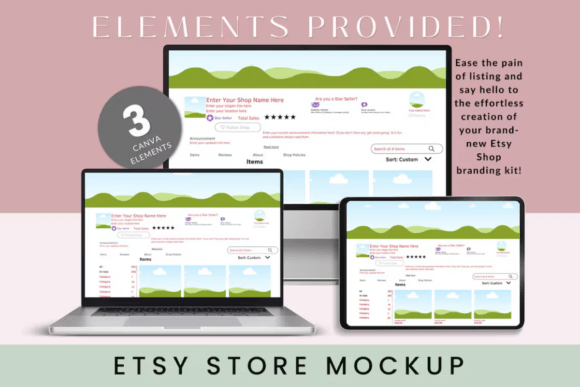
Closely related is the Etsy Store MockUp, which takes this concept a step further by presenting the template within a realistic context. While a standard template might show a flat image of a banner, a mockup displays how that banner looks when placed on a laptop screen, a tablet, or a mobile device. This visualization helps sellers anticipate exactly how their branding will appear to customers across different devices. Together, these tools form a comprehensive kit aimed at unifying the visual language of an online store.
Why Sellers Consider These Solutions
The primary driver for seeking an Etsy Store MockUp or Etsy Shop Template is the desire for efficiency. Creating high-quality graphics from scratch requires a significant investment of time and technical skill. For a seller managing inventory, shipping orders, and responding to inquiries, dedicating days to learning complex design software may not be feasible. These templates offer a middle ground, providing professional-grade layouts that can be customized quickly.
Furthermore, consistency is a key factor in building trust. A disjointed storefront with mismatched fonts, clashing colors, and irregular image sizes can confuse potential buyers. Templates enforce a level of uniformity, ensuring that every element of the shop—from the "About" section to the listing images—feels part of a cohesive brand. This is particularly valuable for new sellers who lack a defined style guide but need to present a polished image immediately.
Key Benefits of Using Templates
- Time Efficiency: The ability to customize a pre-made design significantly reduces the hours spent on branding tasks. Sellers can often update their entire shop look in a single afternoon rather than over several weeks.
- Cost-Effectiveness: Compared to hiring a freelance graphic designer, purchasing a digital template is a fraction of the cost. It provides a budget-friendly entry point for professional aesthetics.
- Accessibility: Most modern templates are compatible with free accounts on platforms like Canva. This removes the barrier of needing expensive software licenses or advanced technical training.
- Visual Clarity: The inclusion of mockups allows sellers to preview their work in real-world settings, reducing the guesswork involved in finalizing designs.
Tradeoffs and Considerations
While the advantages are clear, there are tradeoffs to consider before committing to a generic Etsy Shop Template. The most significant limitation is uniqueness. Because templates are sold to multiple buyers, there is a risk that another shop in your niche may use the same underlying design. If customization options are limited, your store could inadvertently look similar to competitors, diluting your brand identity.
Additionally, templates rely on the user's ability to customize them effectively. Simply swapping out text without adjusting color palettes, typography, or image styles to match the specific tone of the brand can result in a generic appearance. The quality of the final output depends heavily on the seller's eye for detail and willingness to tweak the provided elements beyond the basic instructions.
Another consideration is flexibility. Some templates are rigid, locking users into specific dimensions or layout structures. If a seller plans to expand their business later or needs unique formats for specific marketing campaigns, a standard template might require more effort to adapt than anticipated. It is crucial to review the included files and instructions to ensure the template supports long-term growth.
When Is a Template the Right Fit?
An Etsy Store MockUp and Etsy Shop Template are strong fits for specific situations. They are ideal for new sellers launching their first shop who need to establish a presence quickly without a large budget. In this scenario, having a professional look from day one can boost credibility and encourage early sales.
They are also suitable for established sellers undergoing a rebrand. If a shop needs a fresh look but the owner lacks the time to commission a full redesign, a template offers a rapid solution. Furthermore, sellers who sell seasonal items or run frequent promotions may benefit from having a library of templates to quickly generate consistent marketing materials for holidays or sales events.
Finally, these tools are excellent for those who have a clear vision for their brand but lack the technical skills to execute it. If you know the colors and fonts you want but struggle with alignment, spacing, and composition, a well-structured template handles the technical heavy lifting, allowing you to focus on content.
When to Consider Alternatives
Despite their utility, templates are not the best solution for every seller. If a brand relies heavily on a unique, avant-garde aesthetic that defies standard design conventions, a template may feel too restrictive. In cases where distinctiveness is the primary competitive advantage, investing in custom design work by a professional artist might yield better results.
Similarly, sellers with very specific functional requirements—such as complex infographics, highly specialized product diagrams, or intricate interactive elements—may find standard templates insufficient. Custom design allows for tailored solutions that address unique business needs without compromise.
Lastly, if a seller already possesses strong graphic design skills and enjoys the creative process, using a template might feel limiting. For these individuals, designing from scratch offers greater artistic freedom and ensures that every pixel aligns perfectly with their personal vision.
Making an Informed Decision
Deciding whether to invest in an Etsy Store MockUp or Etsy Shop Template ultimately comes down to balancing time, budget, and brand goals. Before making a purchase, sellers should evaluate their current workload and technical comfort level. If the priority is speed and affordability, and the seller is willing to put in the effort to customize the design, a template is a practical choice.
It is also wise to examine the specific features included in the package. Look for clear instruction guides, editable layers, and supplementary elements that add value. A good template should come with support materials that make the editing process intuitive, regardless of prior design experience. By carefully weighing these factors, sellers can determine if a pre-made solution aligns with their vision or if a custom approach is necessary to truly stand out in the marketplace.